.avif)


.avif)

In this post, I'll dive into real-time transcription: exploring when to use real-time transcription and how developers can access it from meetings. This post is for developers building products on top of meeting data and are evaluating whether real-time transcription is the right fit for their use case.
When you need real-time transcription
There are two ways to get a transcript from a meeting: in real time while the meeting is in progress, or asynchronously after the meeting has ended.
For developers who need access to meeting data while the meeting is ongoing, real-time transcription is the right choice. Common applications include interview coaching, sales call coaching, user research observation room and real-time translation. In these applications, insights and feedback are only valuable only if they are delivered during the conversation itself, making real-time transcription essential.
For applications such as meeting summaries, to-do list generation, action item extraction, and follow-up email drafting, async transcription is the right choice. Because these workflows depend on having access to the entire conversation before insights can be generated, there is little benefit to generating the transcript in real time.
If you are a developer building a product that depends on real-time transcripts, you need a programmatic way to access them.
Get real-time transcription using Recall.ai with just a few lines of code. You can sign up for a free account.
Limitations of using native APIs to get transcripts
I’ll walk through the different ways to programmatically retrieve transcripts in real-time from Zoom, Microsoft Teams and Google Meet.
Programmatic transcript access means developers can receive a transcript using an API.
At a high level, getting a live transcript takes two steps. You first need to obtain the live audio stream from the meeting platform, and then send the audio to a speech-to-text (STT) provider. The output can then be passed to LLMs to generate real-time insights.
If a meeting platform has a native real-time transcript API, you can skip these steps and obtain real-time transcripts directly. But Zoom, Microsoft Teams and Google Meet do not expose their real-time transcripts streams through a developer API, so developers need to first obtain the live audio stream and then send it to a STT provider to generate real-time transcripts.
Google Meet and Zoom allow developers to get the live audio streams using Meet Media API and Zoom RTMS. Meet Media API is currently only available to select beta users, while Microsoft Teams does not have an equivalent solution for real-time media access, making it impossible to natively obtain live audio streams.
Although Google Meet and Zoom provide native APIs for accessing live audio streams, there are challenges beyond setting up a speech-to-text infrastructure. Building the infrastructure to support the native APIs is more complicated than it seems.
One of the biggest challenges is capacity planning. For a small number of users, implementing the Google Meet Media API or Zoom RTMS is straightforward. But it becomes far more difficult when you need to support hundreds or thousands of users.
Developers have no way of knowing exactly when meetings will start, yet when they do, the infrastructure must be ready to establish media streaming sessions immediately. Unlike traditional SaaS, meeting traffic is highly bursty and hard to predict. Concurrent meeting volume may start at five meetings, and spike to several thousands within seconds. The variance persists throughout the day, making capacity planning challenging.
To support these workloads, developers must maintain enough compute capacity to handle unpredictable spikes in demand, even when resources may sit idle for much of the day. However, if too little capacity is provisioned, important meeting data can be lost. If too much capacity is provisioned, infrastructure costs can quickly become expensive.
Meeting Direct Connect allows developers to skip this operational complexity. Developers can just get live transcripts while Recall.ai handles the underlying infrastructure instead of building and maintaining infrastructure for media streaming.
However, the burden of native meeting platforms APIs doesn’t just fall on developers. End users also face several requirements that can make it difficult to consistently capture meeting data, including:
- Remembering to manually start recording and enable transcription for every meeting.
- Having host permissions to access audio streams or recordings.
- Having restrictions by organizational policies.
- Ensuring they are using an account tier that supports the required features.
These limitations are why developers choose Recall.ai instead of building and maintaining platform-specific solutions themselves. I will go over the ways you can implement real-time transcription with Recall.ai in the next section.
Why developers use Recall.ai for transcription
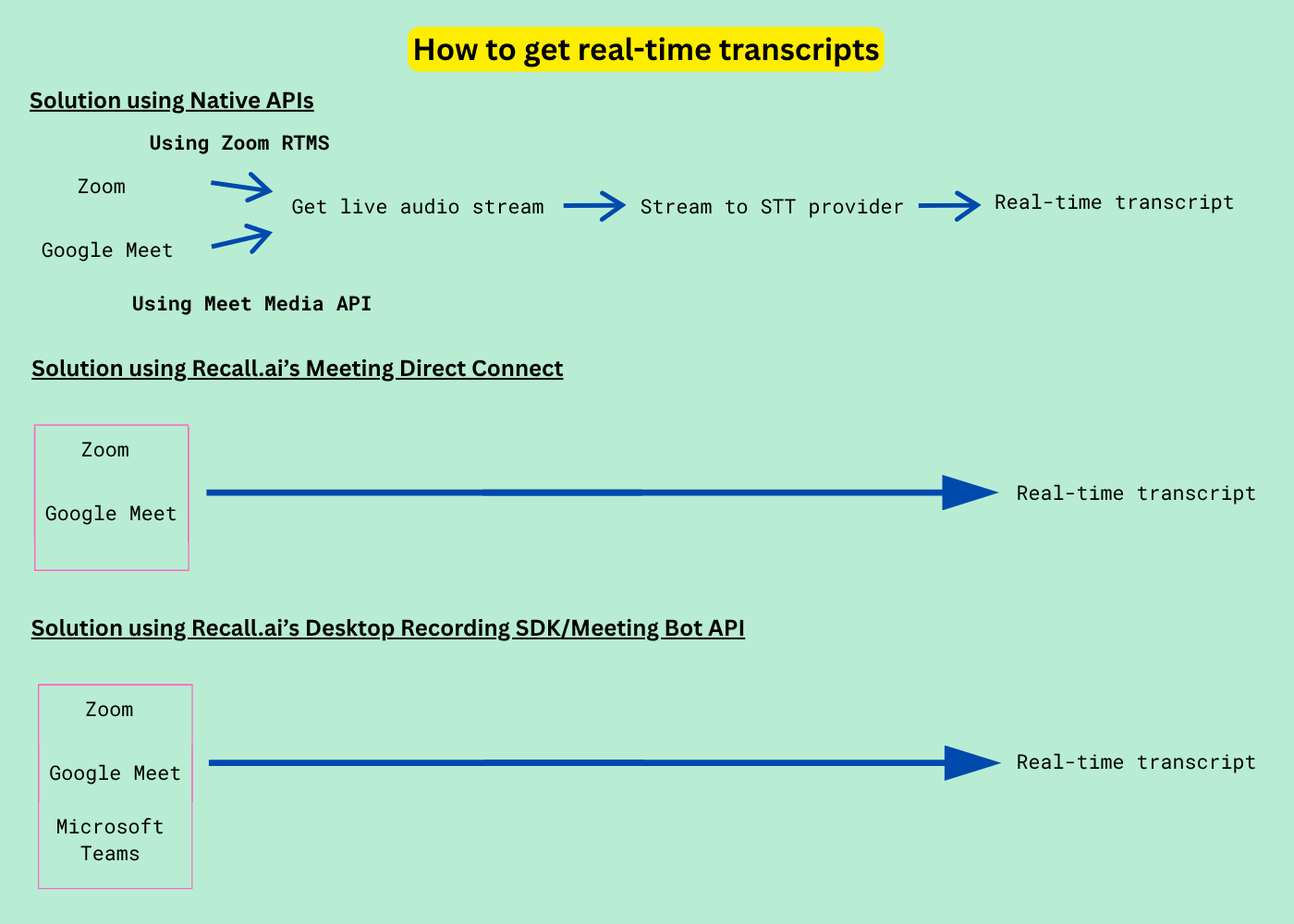
Recall.ai’s Meeting Bot API, Desktop Recording SDK, and Meeting Direct Connect support real-time transcription. You can try it for free.
Using Recall.ai gives developers a single solution that works across all major meeting platforms, eliminating the need to build and maintain separate integrations for each one. We also offer multiple form factors for accessing live transcripts, giving teams the flexibility to choose the option that best fits their use case:
- Meeting Bot API: A meeting bot that can join and record meetings on most major video conferencing platforms
- Desktop Recording SDK: A desktop SDK for recording both online and in-person meetings
- Meeting Direct Connect: A unified API that supports Zoom RTMS and Google Meet Media API
For developers who want to optimize for speed to market, we recommend using the Meeting Bot API or Desktop Recording SDK. Both solutions enable developers to get live transcripts across all major meeting platforms without building the underlying infrastructure.
Recall.ai’s Meeting Direct Connect lets you get live transcripts from both Google Meet and Zoom by configuring your API request. Compared to integrating the Zoom SDK and Google Meet Media API directly, it is a more cost-effective solution that eliminates the technical complexity of building and maintaining platform-specific integrations.
However, if your priority is getting live transcripts in real time, we recommend the Meeting Bot API or Desktop Recording SDK. These solutions provide a more robust experience for end-user applications and support a wider range of meeting platforms beyond Google Meet and Zoom.
In the next section, I will show how easy it is to get live transcripts with the Meeting Bot API and Desktop Recording SDK.
Meeting Bot API
To enable real-time transcription with the Meeting Bot API, developers only need to add a few lines of code when sending a bot into a meeting:
//@title Meeting Bot API
curl --request POST \
     --url https://RECALL_REGION.recall.ai/api/v1/bot/ \
     --header "Authorization: RECALLAI_API_KEY" \
     --header "accept: application/json" \
     --header "content-type: application/json" \
     --data '
{
  "meeting_url": MEETING_URL,
  "recording_config": {
    "transcript": {
      "provider": {
        "recallai_streaming": {
          "mode": "prioritize_low_latency",
          "language_code": "en"
        }
      },
      "diarization": {
        "use_separate_streams_when_available": true
      }
    },
    "realtime_endpoints": [
      {
        "type": "webhook",
        "url": "https://STABLE_PUBLIC_URL/WEBHOOK_ENDPOINT",
        "events": ["transcript.data"]
      }
    ]
  }
}
'
https://www.loom.com/share/0c20157933ed47c48cbdbe17966f88b6
Here is a Github repository that shows how to build a meeting bot that works across all major meeting platforms and generates real-time transcripts.
Desktop Recording SDK
To receive live transcriptions while the Desktop SDK records a meeting, developers only need to add a few lines in their API request to get real-time transcription:
//@title Desktop Recording SDK
const url = 'https:/YOUR_RECALL_REGION.recall.ai/api/v1/sdk_upload/';
const options = {
  method: 'POST',
  headers: {
    accept: 'application/json',
    'content-type': 'application/json',
    Authorization: 'YOUR_API_KEY'
  },
  body: JSON.stringify({
    recording_config: {
      transcript: {
        provider: {
          recallai_streaming: {}
        }
      },
      realtime_endpoints: [
        {
          type: 'desktop_sdk_callback',
          events: ['transcript.data', 'transcript.partial_data']
        }
      ]
    }
  })
};
fetch(url, options)
  .then(res => res.json())
  .then(json => console.log(json))
  .catch(err => console.error(err));
https://www.loom.com/share/571831d623264b0da727eb8e5076098b
| Platform | Post-meeting transcription | Real-time transcription |
|---|---|---|
| Google Meet API | Yes (but currently in beta access) | Yes (but you need to build your own STT integration) |
| Zoom RTMS | Yes | Yes (but you need to build your own STT integration) |
| Microsoft Teams API | Yes | No |
| Recall.ai’s Meeting Bot API | Yes | Yes |
| Recall.ai’s Desktop Recording SDK | Yes | Yes |
| Recall.ai’s Meeting Direct Connect | Yes | Yes |
Now that I have walked you through how to get real-time transcripts from meetings, let’s look at how we can reduce latency and get transcript data even faster.
When to use a low-latency transcription API
For most use cases, the default latency of real-time transcription is sufficient. However, some applications, such as real-time coaching apps, require even lower latency. This is when partial data transcription becomes useful.
Partial data transcription reduces latency by delivering transcript data while speech is still being uttered, rather than waiting for a complete utterance to be said. The difference becomes apparent when a speaker is saying a longer sentence, where the most latency is usually seen.
Enabling partial data transcription is straightforward for both the Meeting Bot API and the Desktop Recording SDK. I will demonstrate how to implement partial data transcription in the Meeting Bot API below.
//@title Partial Data Transcription with Meeting Bot API
const url = 'https:/YOUR_RECALL_REGION.recall.ai/api/v1/sdk_upload/';

const options = {
  method: 'POST',
  headers: {
    accept: 'application/json',
    'content-type': 'application/json',
    Authorization: 'YOUR_API_KEY'
  },
  body: JSON.stringify({
    recording_config: {
      transcript: {
        provider: {
          recallai_streaming: {}
        }
      },
      realtime_endpoints: [
        {
          type: 'desktop_sdk_callback',
          events: ['transcript.data', 'transcript.partial_data']
        }
      ]
    }
  })
};

fetch(url, options)
  .then(res => res.json())
  .then(json => console.log(json))
  .catch(err => console.error(err));
https://www.loom.com/share/22ad810e36314a1db621648dbf7cd7ca
While partial data transcription reduces the time it takes to generate a transcript, it comes at the expense of accuracy as it would stream an utterance before a speaker has finished their sentence. Developers may need a solution that delivers transcripts faster without significantly compromising accuracy.
How to increase transcription quality
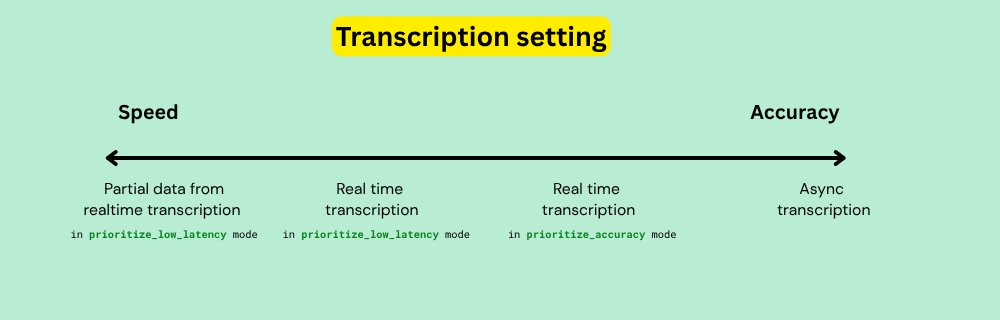
In general, faster transcription comes at the cost of accuracy.
We recognize developers may need a faster alternative to asynchronous transcription while maintaining a higher level of accuracy than what partial data transcription can provide. That’s why we offer multiple options for developers using Recall.ai transcription.
For developers who need transcript data with minimal delay but require greater accuracy than partial transcription, we recommend using the prioritize_low_latency mode. This mode delivers transcript events within 1-3 seconds after speech is finalized.
For cases where you want even greater accuracy and don’t need real-time transcripts, using the prioritize_accuracy mode is the right choice. This mode delivers transcripts shortly after the meeting ends while still providing results faster than asynchronous transcription.
These capabilities are not commonly available across third-party transcription providers and is one of the many reasons we recommend using Recall.ai transcription.
//@title Meeting Bot API with real-time transcription on prioritize_low_latency mode
curl --request POST \
     --url https://RECALL_REGION.recall.ai/api/v1/sdk_upload/ \
     --header "Authorization: RECALLAI_API_KEY" \
     --header "accept: application/json" \
     --header "content-type: application/json" \
     --data '
{
  "recording_config": {
    "transcript": {
      "provider": {
        "recallai_streaming": {
          "mode": "prioritize_low_latency",
          "language_code": "en"
        }
      },
      "diarization": {
        "use_separate_streams_when_available": true
      }
    }
  }
}
'
Using Recall.ai transcription provides affordable pricing while eliminating the overhead of buying and building a separate transcription integration. But if you prefer to use your own transcription provider, we support integrations with third-party transcription providers such as AssemblyAI, Deepgram and ElevenLabs.
The important thing to note is that no matter which transcription provider you're using through Recall.ai, you will get transcripts with actual speaker names, such as “John Smith” and not just “Speaker 1” or “Speaker 2”. This is possible because Recall.ai can access the underlying participant audio streams, rather than relying on machine diarization.
For developers building AI note-taking, meeting summarization or conversation intelligence products, accurate speaker identification is critical. This capability is one of the many reasons why Recall.ai is suited for developers building products on top of meeting data.
If you are interested in building with Recall.ai, you can sign up for a free account or book a demo.
Frequently asked questions
When should I use low latency transcription? You should use low latency transcription when your application needs transcript events as quickly as possible. For example, companies building interactive AI agents may need low latency transcription so that the agent can respond without any delays in the conversation.
How do I decrease transcription latency?
The solution depends on the transcription provider you're using. With Recall.ai Transcription, you can adjust transcription latency.
We recommend starting with prioritize_low_latency mode, which delivers results within seconds after the speech is finalized. For applications where minimizing latency is the top priority, you can use partial data transcription.
Which transcription setting should I use if I care more about accuracy than latency?
Asynchronous transcription provides the highest accuracy. However, if you need transcript data while the meeting is still in progress, real-time transcription with prioritize_accuracy is the best choice. The prioritize_accuracy mode is available to Recall.ai transcription customers.
What transcription providers does Recall.ai support?
While we recommend using Recall.ai transcription, we also integrate with a variety of third-party providers including AssemblyAI, Deepgram and ElevenLabs.
Which Recall.ai products get live transcripts?
The Meeting Bot API, Desktop Recording SDK and Meeting Direct Connect support real-time transcription.


