


.avif)

The TL;DR
- Speaker diarization identifies who spoke when, turning transcripts into structured conversation data.
- It powers tools like meeting notetakers, sales coaching, interview platforms, and medical scribes.
- Accuracy depends heavily on how audio is captured. Approaches that separate speaker audio outperform diarization methods that rely on a single audio track containing multiple speakers.
- Recall.ai provides infrastructure for capturing meeting audio and generating perfectly diarized transcripts with speaker names and emails, in one integration.
Meeting transcripts lose much of their value if you can’t tell who said what. Speaker diarization solves this by matching speech to speakers in recordings.
In this guide, we’ll break down what diarization is, how it works, and how developers can implement it using tools like Speaker Diarization APIs.
What is speaker diarization?
Speaker diarization answers a simple question: who spoke when? It creates a speaker-labeled timeline of the conversation by analyzing audio and separates speech into segments attributed to different speakers.
It’s easy to confuse diarization with transcription, but they solve different problems. Transcription converts speech into text. Diarization adds structure to transcripts by separating the text by speaker. A transcript without diarization is just a block of words with no indication of who said what. A diarized transcript shows the conversation as a sequence of speaker-attributed segments.
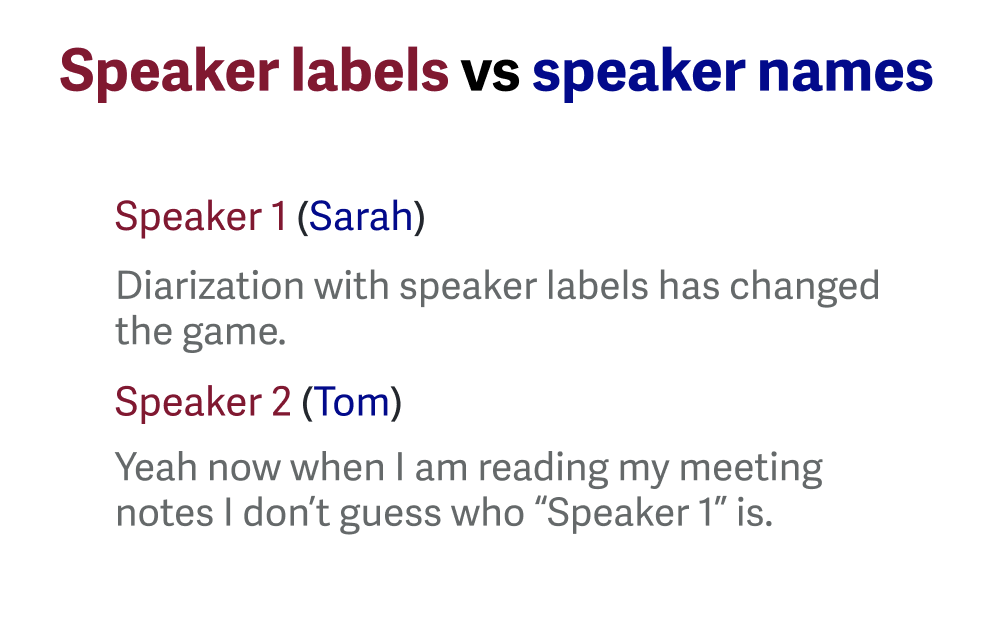
Diarization is also different from speaker identification. Diarization clusters words said by a speaker and assigns labels like “Speaker 1” or “Speaker 2”, whereas speaker identification goes a step further and links the speech to real identities.
How speaker diarization works
There are four common approaches used to produce speaker-labeled transcripts. Recall.ai is the only provider to support all four methods across video conferencing platforms, making it easy to compare each approach.
1. Perfect diarization
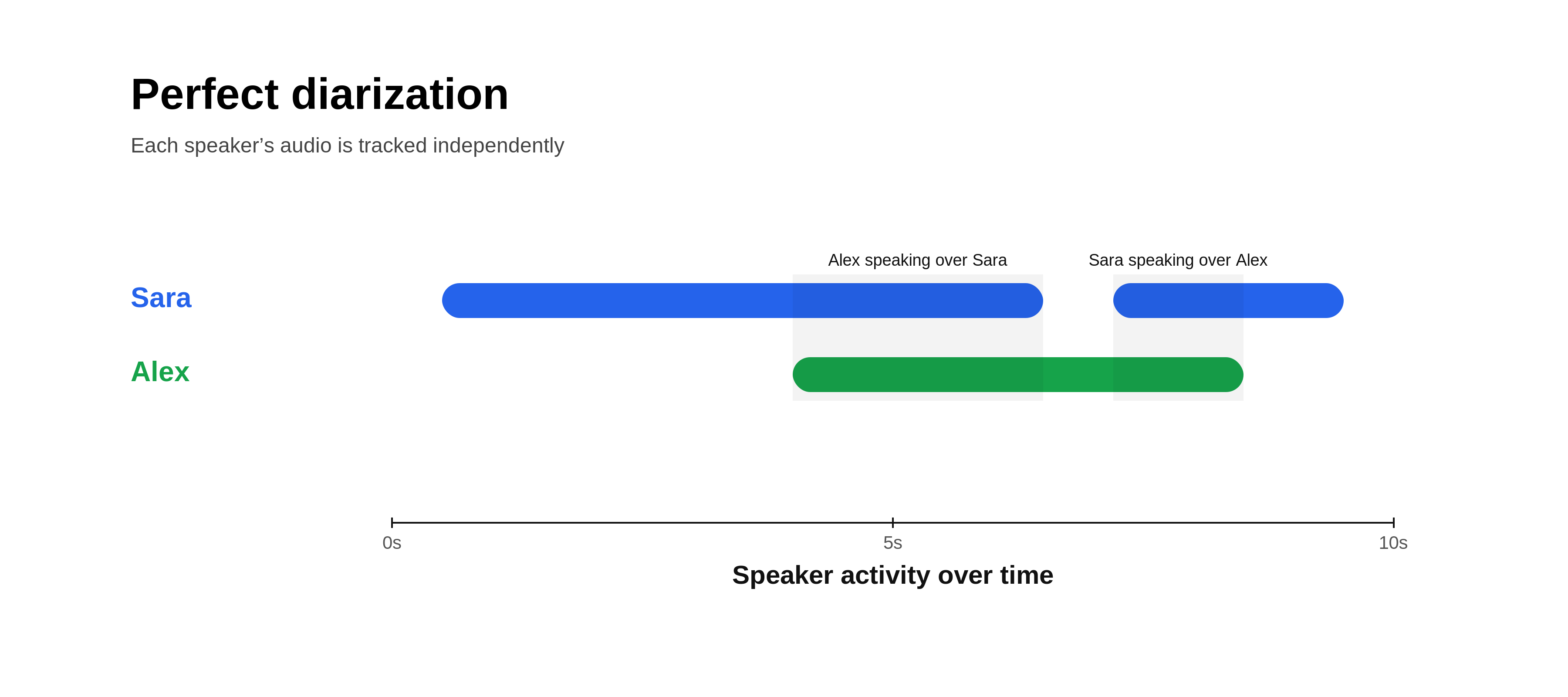
Perfect diarization is a feature unique to Recall.ai that provides 100% accurate speaker attribution, with speaker names.
Instead of transcribing a single mixed audio track (a single audio stream containing all participants’ audio), each participant’s audio is processed independently. Since each audio stream is isolated, speech can be attributed directly, even when audio overlaps.
When each participant joins from their own device, this method can deterministically assign speech to the correct speaker.
If multiple speakers share a device or microphone, other approaches such as machine diarization may still be required.
2. Speaker timeline diarization
Speaker timeline diarization uses signals from the video conferencing platform to determine who is speaking at a given time.
Most platforms track when a participant’s microphone becomes active. Speech within those windows can be attributed to that participant. Because video conferencing platforms also provide participant metadata, transcripts can include real participant names. When participants speak over one another, the active speaker tag often remains assigned to just one speaker, making this approach unreliable on its own.
How this data is exposed varies by platform:
- Zoom exposes an
OnActiveSpeakerChangeEventwith timestamps and active participants, making it straightforward to construct a speaker timeline. - Google Meet does not provide a direct active speaker event. The
conferenceRecords.transcripts.entriesAPI can attach transcript segments to participants after transcription, if native transcription was enabled. For real-time use, the Meet Media API exposes RTP streams. Each RTP packet contains a Synchronization Source identifier and each participant has a Contributing Source identifier, and the active speaker can be inferred by tracking audio levels across those streams. - Microsoft Teams does not expose a native active speaker event. Instead, bots access participant audio through real-time media APIs and infer speaker changes based on audio activity.
This approach works best when each participant has their own device and speakers do not talk over one another. Accuracy drops when speakers overlap, switch rapidly, or share a microphone, since it becomes harder to correctly label the active speaker, especially when multiple speakers use the same device.
3. Machine diarization

Machine diarization is often performed by transcription providers that analyze the audio and attempt to separate speakers using differences in voice characteristics, acoustic patterns, and context clues like participants referring to one another by name in a meeting.
Machine diarization is relatively effective in separating out transcripts for each participant, but is unable to assign identities for speakers, resulting in anonymous speaker labels, like “Speaker A” or “Speaker 1”.
Machine diarization relies heavily on voice identification. If voices sound similar or if multiple people speak at the same time, accuracy suffers. Similarly, if separate audio streams are merged into a single track before being sent to the diarization provider, overlapping speech may be lost or truncated, leading to errors in both transcription and speaker attribution.
4. Hybrid diarization
Hybrid diarization combines speaker timeline attribution or perfect diarization with machine diarization. When participants have separate audio streams, speech is directly attributed to named participants. When multiple people share a microphone, machine diarization is used to separate voices within that stream.
This approach helps maintain speaker attribution even in multi-speaker environments like conference rooms.
Assigning speaker labels
Regardless of the approach used, diarized transcripts follow a similar structure. Diarized transcripts are divided into segments, each labeled with a speaker. Labels may be generic (e.g., “Speaker 1”) or include real participant identities when participant metadata is available.
If you want a deeper explanation of the difference between speaker labels and speaker names, our article on Speaker Labels and Names explains how speaker identity appears in transcripts.
How diarization can go wrong
Diarization errors originate from both the input audio and the diarization algorithm. Input audio issues include overlapping speech, similar voices, coughing, sneezing, and background noise. Model limitations include error propagation and difficulty separating voices that have similar pitch or accent.
The most reliable fix is also the most mechanical. Instead of forcing diarization to untangle a single mixed audio track, a more reliable approach is to use perfect diarization to process separate audio streams per participant. Using this method, each speaker’s audio is already isolated before transcription begins.
Ways to get diarized transcripts
You can generate diarized transcripts in several ways. The right approach depends on how much control you have over audio capture and how you plan to use the output.
Dedicated diarization APIs

Dedicated APIs return structured transcripts with speaker-labeled segments, timestamps, and metadata that applications can use directly. Some APIs also include speaker identity (e.g., names and emails), which enables workflows like CRM updates or automated follow-ups.
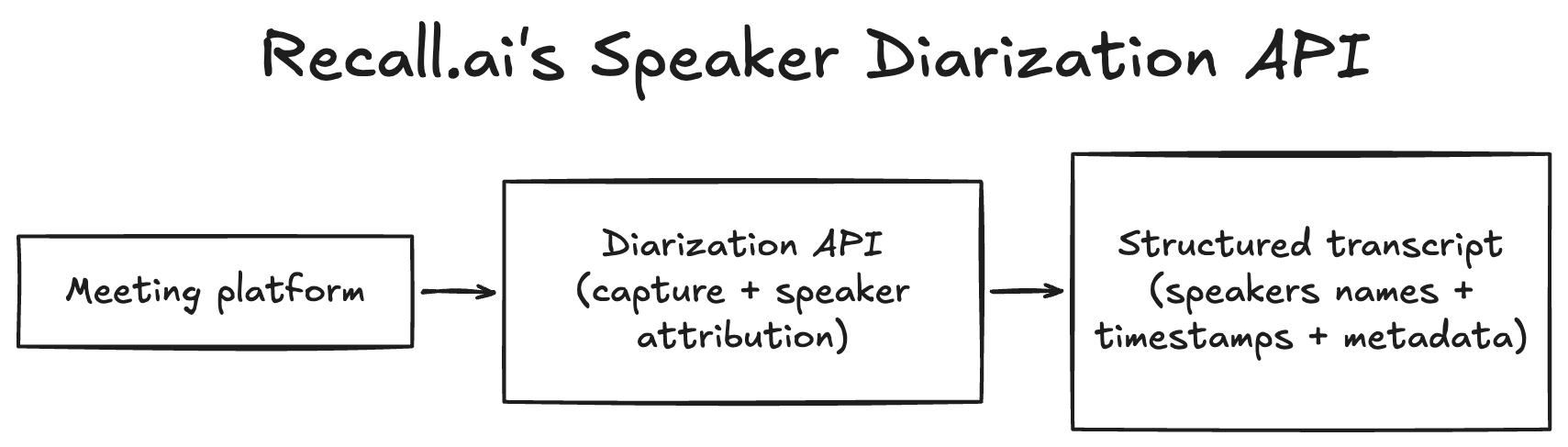
Developers can also automate meeting capture using certain speaker diarization APIs. For example, Recall.ai’s Speaker Diarization API captures audio across conferencing platforms and returns diarized transcripts with actual speaker names for both real-time and async use cases. Because audio is captured directly, developers don’t need to build their own recording pipeline, and speaker attribution is preserved even during overlapping speech when separate audio streams are available.
Speech-to-text APIs with diarization

Many transcription APIs include diarization as a feature (e.g., AssemblyAI, Deepgram, AWS Transcribe, Google Cloud Speech-to-Text).
These systems can perform well, but accuracy depends heavily on the quality of input audio. Mixed audio tracks make it harder to separate speakers, especially with overlap or similar voices. These APIs also return anonymous labels (e.g., “Speaker 1”) rather than real identities.
Using these APIs typically requires building your own audio ingestion pipeline to capture and send meeting audio.
Pre-built transcription tools

End-user tools like meeting notetakers and built-in platform transcription (Zoom, Google Meet, Slack Huddles) can also provide diarized transcripts.
These are easy to use but come with limitations. Built-in transcription is usually platform-specific. Both built-in tools and standalone notetakers also tend to generate transcripts after the meeting and return formatted output for reading rather than structured data for programmatic use.
Common applications that rely on speaker diarization
Reliable speaker attribution enables several workflows:
Meeting assistants: Generate accurate notes, summaries, and action items tied to the correct speaker.
Sales call analysis: Attribute talk time, objections, and buying signals for sales coaching and deal review.
Customer support QA: Evaluate agent behavior at scale, including interruptions and escalation handling.
CRM enrichment: Extract next steps and action items from sales calls, and auto-generate notes from the meeting recording.
Interview platforms: Enable structured evaluations and searchable transcripts across candidates.
Legal workflows: Produce transcripts with clear speaker attribution for depositions and proceedings.
Healthcare documentation: Separate clinician and patient speech for accurate notes and records.
How to evaluate ways to get diarized transcripts programmatically
When evaluating diarization APIs, several factors determine whether a specific API will work reliably.
| Capability | Dedicated Diarization API | Speech-to-Text API with Diarization | Pre-built Transcription Tool | Recall.ai API |
|---|---|---|---|---|
| Structured transcript output | ✅ | ✅ | ❌ | ✅ |
| Speaker identity (names or emails) | ⚠️ Sometimes | ❌ | ⚠️ Sometimes | ✅ |
| Handles overlapping speech reliably | ⚠️ Depends on implementation | ⚠️ Depends on model | ❌ | ✅ |
| Works with shared microphones | ⚠️ Depends on model | ⚠️ Depends on model | ❌ | ✅ |
| Cross-video conferencing platform audio capture | ❌ Requires your own pipeline | ❌ Requires your own pipeline | ❌ Usually platform-specific | ✅ |
| Real-time diarization | ⚠️ Sometimes | ⚠️ Sometimes | ❌ Usually post-meeting | ✅ |
| No custom recording pipeline required | ⚠️ Sometimes | ❌ | ✅ | ✅ |
| Designed for developers | ✅ | ✅ | ❌ | ✅ |
Speaker identity
Many APIs return generic labels like “Speaker 1” or “Speaker 2”. If your application needs to know who said something, the ability to include speaker names or participant emails in transcript segments makes it much easier to trigger actions like emailing participants, updating CRM records, or assigning tasks.
To test this capability, record a meeting or upload an audio file and review the diarized transcript to see whether real identities appear in the output.
Overlapping speech
When multiple people talk at the same time, diarization systems that rely on a single mixed audio track often assign speech to the wrong speaker. Systems that process separate audio streams for each participant tend to handle overlapping speech more reliably.
To test this, record a conversation where participants intentionally talk over one another and verify whether the transcript attributes the overlapping speech correctly.
Shared microphones
Another challenge occurs when multiple people share the same microphone, such as in conference rooms. Some diarization systems merge those voices into a single speaker or miss speech entirely.
To test this scenario, record audio with multiple voices coming from the same source and evaluate whether the system separates them accurately. Recording yourself while playing a podcast using your laptop or phone to record is an easy way to create the recording.
Video conferencing platforms
Lastly, it’s important to consider how the solution works across video conferencing platforms. Many pre-built transcription tools only work within a single video conferencing platform. If your product needs to support multiple conferencing environments, you’ll need to build separate recording and processing pipelines for each platform.
To test this, start meetings across different video conferencing platforms and record each meeting (for tutorials on how to record on each video conferencing platform see our articles on how to record a Google Meet, how to record a Zoom meeting, how to record a Microsoft Teams meeting). Confirm that the system successfully captures audio and produces transcripts on each desired platform.
Summing it up
Speaker diarization assigns speech to speakers, turning transcripts into structured conversation data.
In practice, accuracy depends heavily on how audio is captured. Systems that rely on a single mixed audio track must infer speaker boundaries and often struggle with overlap or similar voices. Systems that work with separate audio streams can attribute speech directly and are significantly more reliable.
If you’re building on top of meeting data, it’s worth testing diarization under real conditions, overlapping speech, shared microphones, and multiple platforms, before choosing an approach.
If you’ve decided to add diarization to your meeting transcripts, Recall.ai provides infrastructure for capturing meeting audio and generating diarized transcripts across video conferencing platforms. Through APIs like the Speaker Diarization API, developers can record meetings with the Meeting Bot API or Desktop Recording SDK and access features like perfect diarization when separate participant audio streams are available.
Speaker diarization FAQs
Here are quick answers to the most common questions about speaker diarization.
What is speaker diarization?
Speaker diarization is the process of identifying who spoke when in an audio recording. It segments conversations by speaker, turning raw transcripts into structured dialogue with speaker attribution and timing.
How accurate is speaker diarization?
Accuracy depends heavily on how audio is captured. Systems that analyze mixed audio recordings may struggle with overlapping speech or similar voices, while approaches that process separate audio streams for each participant can achieve perfect diarization.
Can I get diarization in real time?
Yes. Some systems generate diarized transcripts while a meeting is happening.
Recall.ai provides real-time diarization through its Speaker Diarization API.
How do I integrate diarization into my AI app?
Most teams integrate diarization through APIs that return speaker-labeled transcripts and metadata.
Recall.ai provides this infrastructure through its Speaker Diarization API, Meeting Bot API, and Desktop Recording SDK.
Which diarization methods offer 100% accuracy?
Only Recall.ai is capable of 100% accurate diarization. By transcribing separate participant audio streams instead of a single mixed audio track, Recall.ai can correctly attribute speech even when multiple people talk at the same time across video conferencing platforms.
What metadata can diarization APIs provide?
Recall.ai’s API links speech to speaker names, timestamps, and participant emails. It is the only API that offers all of this metadata.
Which diarization API is the most reliable and stable?
Recall.ai provides the most reliable and stable diarization. Recall.ai is designed to provide reliable meeting recording and transcription APIs across video conferencing platforms. That same focus on reliability extends to speaker diarization, so developers receive consistent speaker-labeled transcripts even as usage and meeting volume grow.
How do I build a notetaker with speaker diarization?
To build a notetaker that can take actions like summarizing meetings and generating action you can follow our guide on how to build a meeting notetaker. It walks through building a notetaker from scratch and all of the technical challenges to consider.


