


One of the most valuable use-cases for LLMs is to analyze the transcript of a conversation.
They can extract:
-
Prospect pain points from sales conversations.
-
Action items from internal meetings.
-
Patient symptoms from telehealth sessions.
-
And more.
However, for LLMs to produce accurate results, the transcript must contain speaker labels.
What are Speaker Labels?
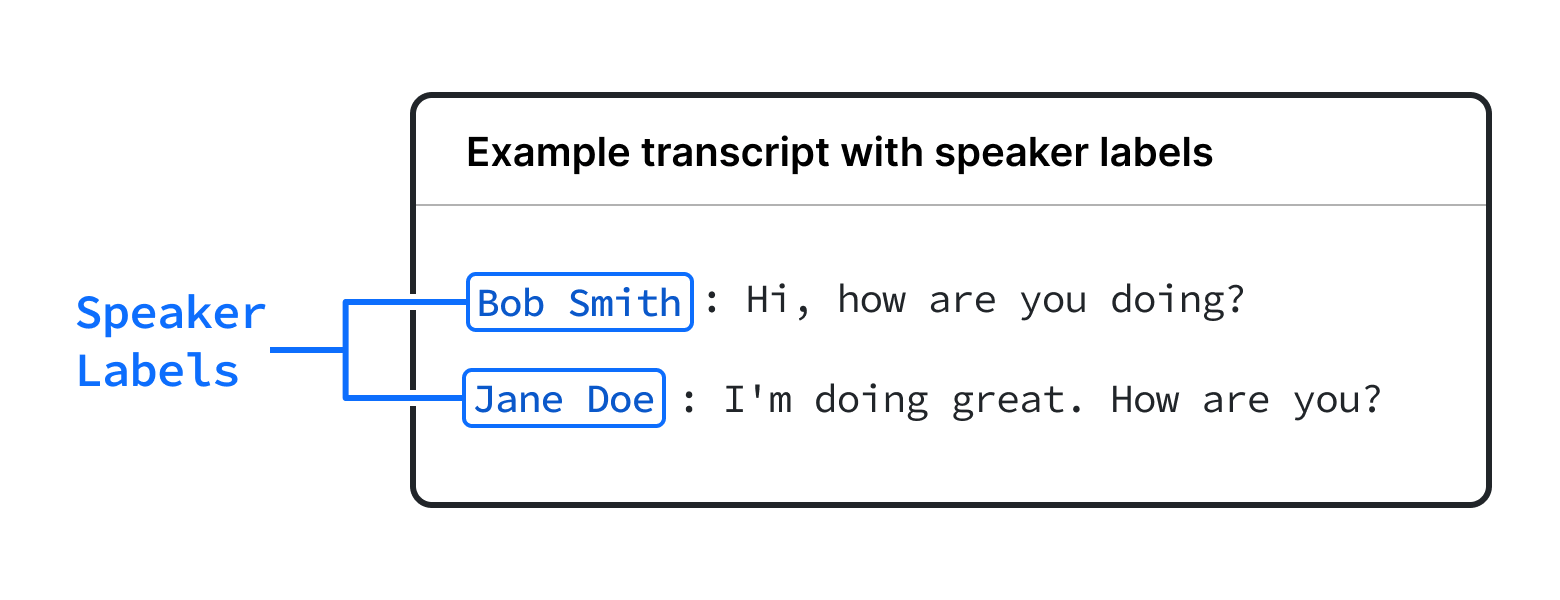
Speaker labels, also known as speaker diarization, tells you who spoke each word of a transcript.
Here is an example of a transcript with speaker labels:
Why Do You Need Speaker Labels?
Reason 1: Speaker labels enable LLMs to analyze transcripts more accurately
LLMs benefit massively from knowing who spoke each word, as that gives a significant amount of context into the conversation.
For example, in the following transcript snippet without speaker labels, ChatGPT produces the following action items with a simple prompt:
---- Input ----
We need to follow up with the potential client from last week. I can do that. We also need to prepare a customized proposal for them. I'll handle that.

---- Output ----
Follow up with the potential client - Responsibility: Ambiguous
Prepare a customized proposal - Responsibility: Ambiguous
The LLM struggles to determine who is responsible for each task because the speakers are not identified, and it’s not clear that this is a conversation between two people.
However if we add speaker labels, the structure and participants of the conversation become much more clear, and the LLM does a much better job.
----- Input ----
John: We need to follow up with the potential client from last week.
Sarah: I can do that.
John: We also need to prepare a customized proposal for them.
Mike: I'll handle that.

---- Output ----
Follow up with the potential client - Responsibility: Sarah
Prepare a customized proposal - Responsibility: Mike
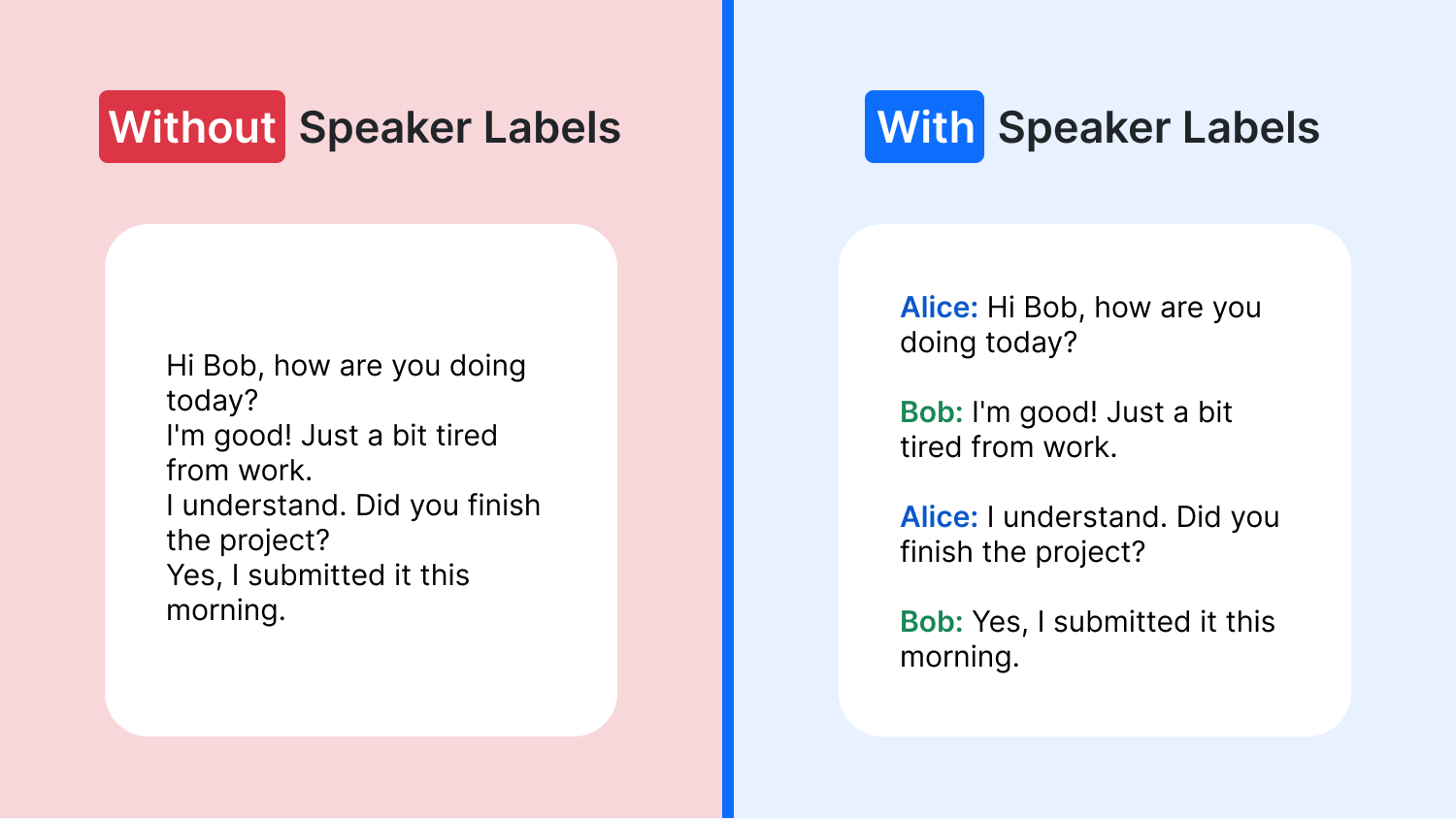
Reason 2: Speaker labels help readers follow a transcript
If you’re displaying transcripts in your app, it’s much easier to read when they include speaker labels, since they break up the conversation into natural segments.
How to Get Speaker Labels for your Transcripts
There are a few options to get speaker labels for transcripts:
Option 1: Use the Recall.ai API
Transcripts captured through the Recall.ai API include speaker labels built-in. With Recall.ai, you would get a transcript format like the following.

Recall.ai works with conversations on Zoom, Microsoft Teams, Google Meet, or other video conferencing platforms, and integrates directly with the video conferencing platform to retrieve the speaker names.
Here is a short video of how to get a transcript with speaker labels using Recall.ai API:
Interested in trying out the Recall.ai API?
Option 2: Use Machine Diarization
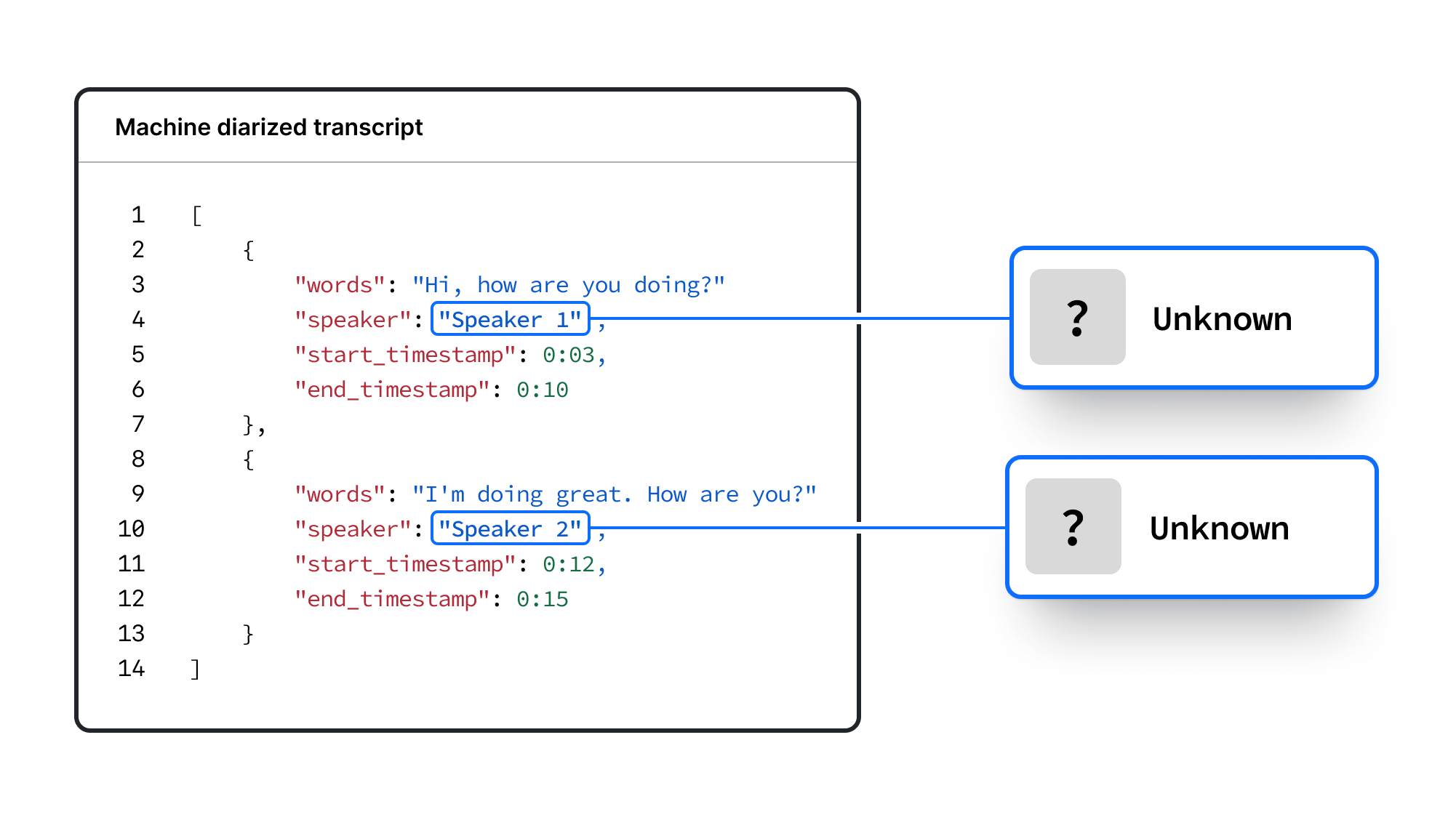
Machine diarization is a technology that figures out when different people are speaking by analyzing their unique voice patterns.
Most transcription APIs have machine diarization built-in, and this can typically be enabled by setting the correct API parameter.
However, the speaker labels produced by machine diarization will be placeholders like “Speaker 1” or “Speaker 2”. This is because the transcription AI doesn’t have a way to figure out the actual names of the participants.
Machine diarization has a couple of downsides:
-
The speaker labels provided by machine diarization are not the speaker’s actual names, but instead, a placeholder label like “Speaker 1”, “Speaker 2”.
-
The accuracy of the speaker labeling depends on how unique each voice is in a recording.
-
The accuracy of the speaker labeling depends on the audio quality.
-
The accuracy of the speaker labeling depends on the number of speakers. The more speakers there are, the less accurate machine diarization will be.
-
If there are multiple speakers talking over each other, machine diarization will not be able to separate out each individual speaker.
-
If a speaker only says short phrases, such as "Got it" or "Yes," machine diarization has difficulty identifying them as a distinct speaker.
Despite these downsides, machine diarization can be a good option when conversations are not held on a video conferencing platform. Here are some popular transcription APIs that have machine diarization built-in:
Popular Use Cases for Speaker Labels
Sales Coaching Software
If you’re building an app that records and transcribes sales calls, speaker labels allow you to understand when the salesperson or prospect is speaking. From there, you can derive additional information, such as:
- Salesperson vs prospect talk time
- How closely a salesperson followed the sales script
- A summary of the prospect’s pain points
A real example
Sybill provides sales coaching software that automatically fills out the CRM, drafts follow up emails, and summarizes the sales meeting. Knowing if it was the salesperson speaking or the prospect speaking was critical for them to be able to analyze conversations accurately.
Interviewing Software
If you want to analyze interview dynamics, speaker labels allow you to derive information such as:
-
Interviewer vs. interviewee speaking time
-
Types of questions asked and their responses
-
Key moments in the interview
Furthermore, if you know the speaker name, you can typically fuzzy match the speaker name with the invitees on the calendar invite of the interview to figure out which email corresponds to which speaker. Unfortunately, it is not possible to get the speaker's email directly, so this workaround must be used.
Recall.ai powers a number of companies building interviewing software, such as BrightHire and Metaview. Recall.ai enables them to not only get speaker-labeled transcripts, but also enables them to get video recordings and metadata from interviews.
Virtual Legal Deposition Software
In virtual legal deposition software, speaker labels help distinguish between different parties involved, such as the lawyer, witness, and opposing counsel. This allows you to:
-
Track who asked which questions
-
Analyze responses in the context of the questioner
-
Create accurate legal records
Telehealth Software
In telehealth consultations, it’s essential to know if the doctor or patient is speaking. This helps to:
-
Monitor and document the consultation accurately
-
Track patient concerns and doctor’s responses
Conclusion
In this article, we’ve covered why speaker labels are important, as well as how to get speaker labels for your transcripts.
If the conversations you’re transcribing are on video conferencing platforms, you can use an API like Recall.ai to get speaker labels with accurate participant names.
If the conversations you’re transcribing are happening elsewhere, you can use a transcription service that has built-in machine diarization to label speakers as “Speaker 1”, “Speaker 2”.
Either way, adding speaker labels to your transcripts gives your LLMs the necessary context to extract more information from your conversation data. Happy building!
Frequently Asked Questions
What is the difference between diarization and speaker labels?
Diarization is the process of assigning the parts of a transcript to the correct speaker. Speaker labels are the identifiers placed on the transcripts - they can either be generic (“Speaker 1,” “Speaker 2”) or correspond to the names of the actual participants in a meeting ("John Brown," "Jane Smith").
Why do LLMs need speaker labels to analyze transcripts?
Speaker labels give an LLM the context of who said what, which is essential for tasks like assigning action items after the meeting or creating effective meeting summaries. Without them, the model often can't tell that it’s even reading a multi-person conversation, which leads to ambiguous results.
Can machine diarization identify speakers by their real names?
No. Machine diarization can tell voices apart, but it has no way to know who those voices belong to, so it assigns placeholder labels like "Speaker 1." To get real participant names, you need a tool that integrates with the meeting platform, such as the Recall.ai speaker diarization API.
How accurate are speaker labels from machine diarization?
Accuracy depends on how distinct each voice is, the audio quality, and the number of speakers - the more speakers there are, the less accurate it tends to be. It also struggles when people talk over each other, or when someone only says short phrases. For this reason, we recommend using a tool that offers perfect diarization.
How do I get speaker labels with real participant names?
If your conversations happen on a video conferencing platform, you can use Recall.ai's speaker diarization API to integrate directly with Zoom, Microsoft Teams, Google Meet, and other meeting platforms to pull each participant's real name into the transcript. For conversations outside those platforms, machine diarization with placeholder labels is the usual fallback.
Can I match speaker labels to email addresses?
For customers using the calendar integration API, Recall.ai can match the speaker's name against the participants on the calendar invite to figure out which email belongs to which speaker.


