


.avif)

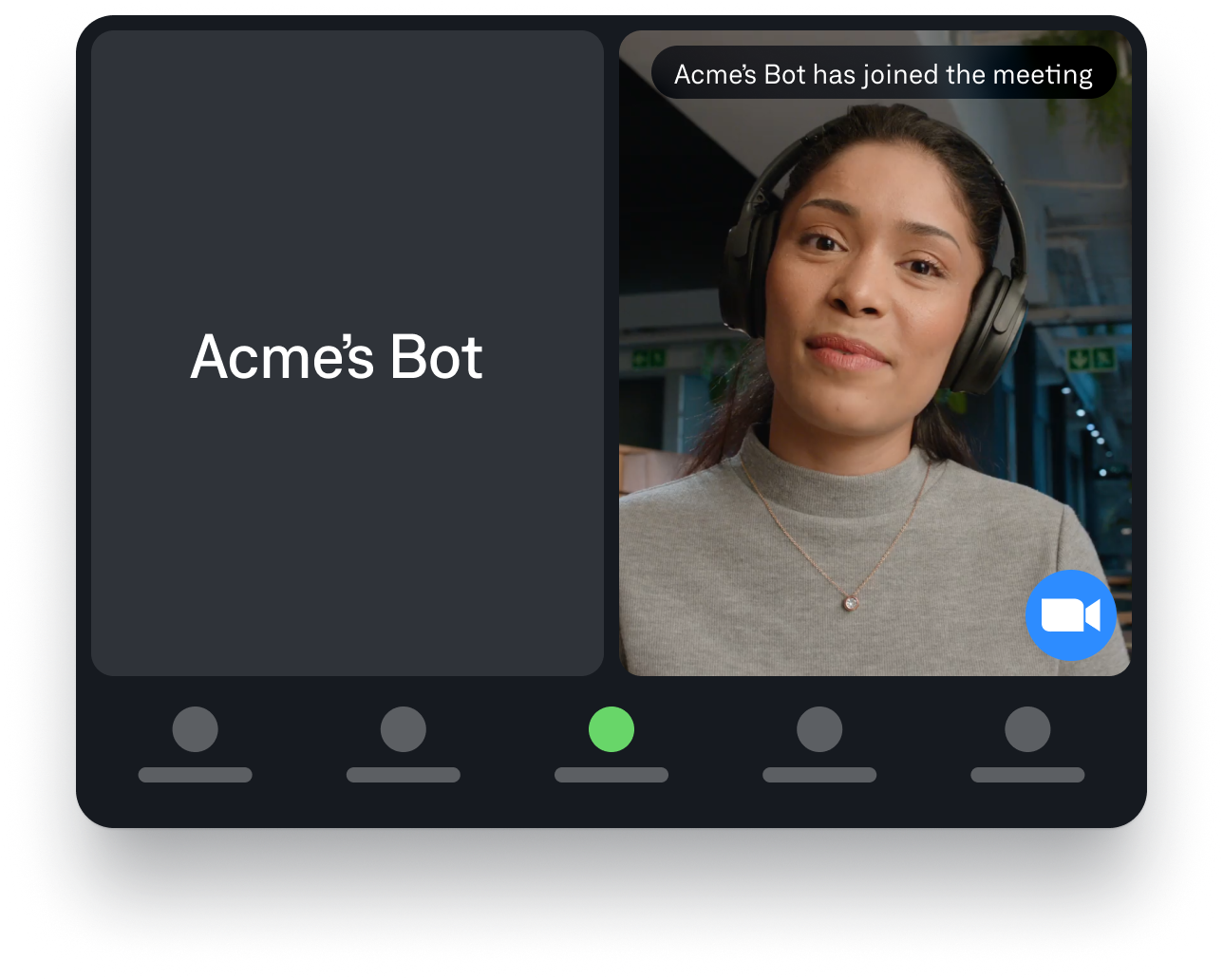
A meeting bot is a virtual participant that joins video calls (Zoom, Google Meet, Microsoft Teams, Slack Huddles, etc.) to ingest meeting data and sometimes output data back into the meeting in real time.
At a minimum, a meeting bot can:
- Join a meeting as a participant
- Capture data from the meeting. The exact data varies by platform and implementation, but common examples include audio, video, transcripts, chat, and metadata.
- Expose that data to your application for processing (e.g., transcription, LLMs, analytics)
Some meeting bots, such as those built with Recall.ai’s Meeting Bot API, can also:
- Output data back into the meeting (e.g., play audio, show a video tile, send chat messages)
- Act as an in-meeting agent
- Identify participant emails
- Join scheduled meetings using a calendar integration
- And more
If you’ve seen a participant named “[INSERT NAME HERE]’s Notetaker,” “Meeting Copilot,” or “Meeting Assistant,” you’ve seen a meeting bot. Some companies build these bots in-house, while others choose to use meeting bot APIs such as Recall.ai. Meeting bot APIs allow teams to deploy meeting bots without having to build or operate the underlying meeting bot infrastructure.
In the sections below, I’ll outline when meeting bots make sense and when they don’t, walk through how meeting bots work across major video conferencing platforms, and break down what data they can access and the main architectural tradeoffs involved.
When a meeting bot makes sense (and when it doesn’t)
Choosing the right way to access meeting data depends on several factors: what data you need from the meeting, what data you need to send into the meeting, which video conferencing platforms you need to support, and whether that data must be available in real time or after the meeting. Your method also depends on how you want to gather the data in the first place.
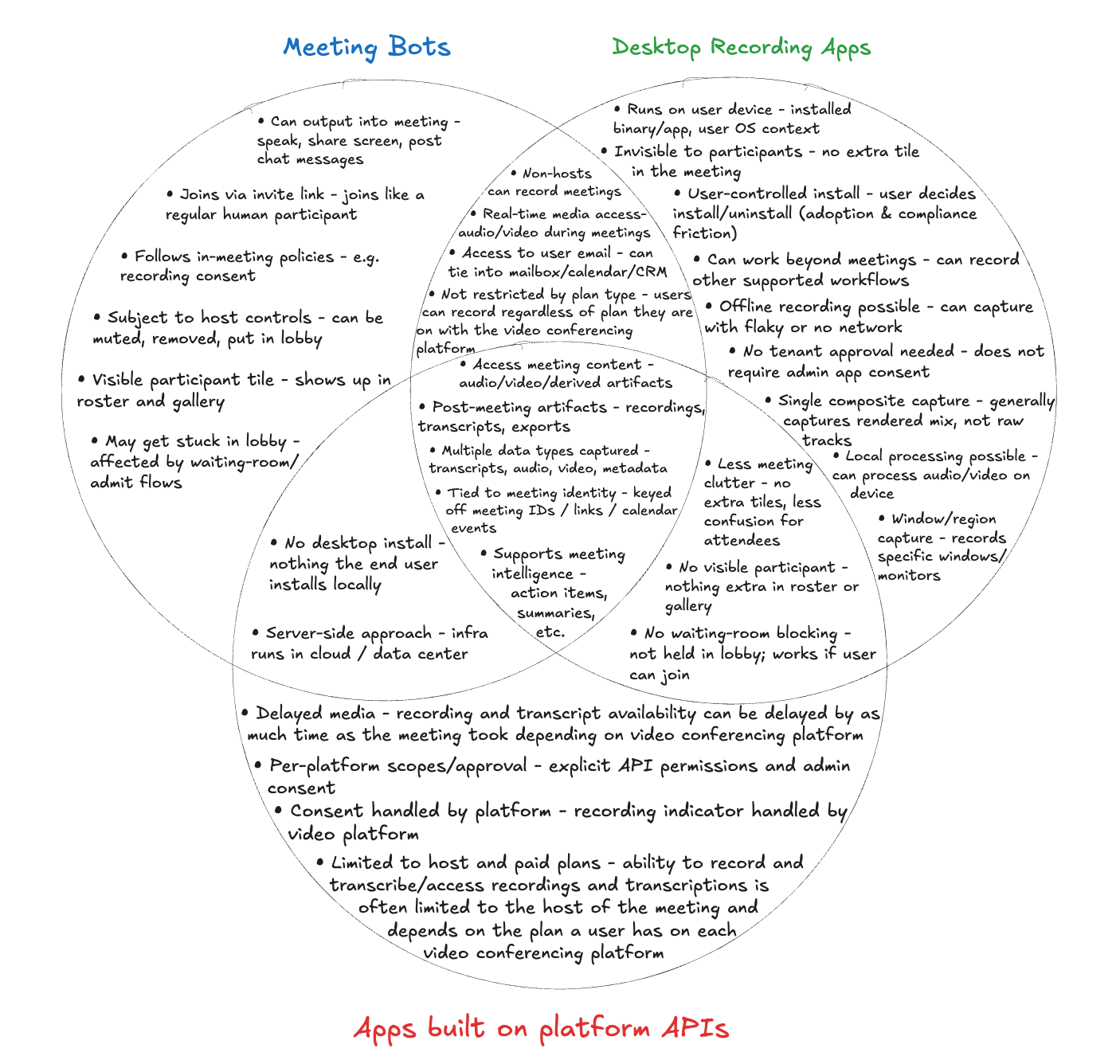
There are three primary ways to capture meeting data today: meeting bots, desktop recording apps/SDKs, and video conferencing platform REST APIs. Most teams ultimately need to choose one approach based on their product requirements, because each form factor is optimized for a different aspect of the meeting-data problem. The Venn diagram below illustrates not only where they overlap, but also the distinct strengths that sets each option apart.
When a meeting bot is the right fit
Meeting bots are a great option when you want to collect meeting data without the restrictions imposed by video conferencing platform plan tiers or needing the user to be the host of the meeting, and without requiring users to install software. Because meeting bots are widely used, they provide a capture method that meeting participants already understand. Meeting bots also work consistently across major meeting platforms and allow your product to receive data in real time or after the meeting.
Because a meeting bot joins the call as a participant, it has access to the most complete data set available: raw audio and video, chat, captions, screenshare events, participant metadata (including emails), and detailed activity signals. No other form factor provides this breadth of information.
Some meeting bots can also ensure 100% perfect diarization, which means producing transcripts where every word is attributed to the correct speaker.
A meeting bot is also the only option when your product needs to participate in the meeting itself. For example, meeting bots allow your product to speak, send chat messages, or present content.
If this form factor seems like the best fit, you have a few options. If you want to integrate a meeting bot into your own product, you can build a meeting bot from scratch, which requires a separate implementation for each platform you want to support, or you can use a Meeting Bot API to deploy your own bot and exchange data with the meeting.
Constraints to keep in mind
However, meeting bots do come with constraints. They are always visible to everyone in the meeting, which may not be desirable for every workflow. They are also subject to platform-level rules: some meetings require host approval to admit the bot, and others may block bots entirely based on admin settings. If you build your own meeting bot, each platform becomes a separate integration with its own quirks: Zoom’s waiting rooms, Google Meet’s changing interface elements that bots must track, Microsoft Teams’ breakout rooms, etc. If you use a meeting bot API like Recall.ai to build your meeting bot, much of this complexity is abstracted away, but the underlying platform limitations still apply.
These constraints don’t make meeting bots bad. After all, every form factor has tradeoffs. These are simply the things you should be aware of before choosing which approach fits your use case.
When other capture methods make sense
Desktop recording apps similarly work well for receiving meeting data in real time or after the meeting. They are the only option when you need a solution that works across video conferencing platforms to access real-time data but do not want a visible participant in the call. A desktop recorder runs on the user’s machine, captures whatever is visible or audible on that device, and remains completely invisible to other attendees. This approach avoids waiting rooms, host approvals, and bot policy restrictions. Desktop recording apps also work regardless of which plan end users are on with the video conferencing platforms, and works regardless of if your users are the host of the meeting or not. However, they require users to install an app, which may be difficult in organizations with strict IT policies. It is the most reliable way to capture real-time data without joining the meeting, though it cannot provide perfect diarization because it captures a mixed audio stream rather than separated speakers. The easiest way to build a desktop recording app is by using a Desktop Recording SDK.
Apps that rely on REST APIs that the video conferencing platforms provide can be a viable solution when you only need post-meeting artifacts such as recordings, transcripts, or attendance lists, but with several constraints. This approach can be simple but is limited to what each platform chooses to expose, and every platform has its own permissions, review processes, and API behavior. Users generally must be on a paid plan, and they often must be the meeting host. These methods cannot deliver real-time transcripts, and processing is slow; for example, a 30-minute meeting may take roughly 20 minutes to become available. Users typically must remember to click the “record” button at the start of every meeting. Auto-recording is available on some video conferencing platforms, but typically requires IT administrators to enable specific settings in advance, and the APIs expose only the data each platform is willing to provide. If the above restrictions aren’t dealbreakers, then these REST APIs can work for single-platform products, but supporting multiple platforms means either maintaining several separate integrations or building an abstraction layer. Regardless of whether you decide to abstract away platform specifics, building with the native video conferencing platform REST APIs requires ongoing engineering time to keep up with API, permission, and behavior changes, and that maintenance often becomes one of the largest long-term costs.
Each form factor has its own strengths based on real-time needs, visibility preferences, platform coverage, and operational complexity.
What data a meeting bot can access
A meeting bot can access the same in-meeting audio, video, chat, and activity signals that platforms expose to participants. Availability varies by platform, but the data types below represent what most bots can retrieve.
Data a meeting bot can access
| Data Type | What It Means |
|---|---|
| Audio | The bot can capture audio from the meeting in real time. |
| Video | The bot can capture participant video tiles and screenshares. |
| Transcript | The bot can either use the audio as raw data for a transcription service or read live captions if the platform exposes them. |
| Chat Messages | The bot can read messages posted in the meeting chat. |
| Screenshare Activity | The bot can detect when screensharing starts or stops. |
| Participant Activity | The bot can observe when participants join/leave, mute/unmute, camera on/off, and similar signals. |
| Meeting Details | The bot can access the meeting title, host information, participant emails, meeting duration, and other meeting metadata. |
Note: Availability varies by video conferencing platform. Some video conferencing platforms offer richer raw media and metadata than others, but the list above reflects the common data types that meeting bots typically access when they join a call.
What a meeting bot can output back into the meeting
Meeting bots can send audio, chat messages, video, and screenshares into the meeting, enabling use cases such as consent announcements, customization of the meeting bot’s tile, and interactive meeting agents.
Data a meeting bot can send into the meeting
| Output Type | What It Allows the Bot to Do |
|---|---|
| Play Audio | Make announcements, play hold music, converse with participants. |
| Send Chat Messages | Send chat messages with links, instructions, or updates. |
| Show a Video Tile | Display slides, animations, or generated visuals as its participant tile. |
| Share Screen | Present content to everyone in the meeting. |
How meeting bots work (technical overview)
The easiest way to understand how meeting bots work is to break the process into three stages:
- Joining the meeting
- Capturing what happens inside the meeting
- Supporting multiple meetings at scale
1. Joining the meeting
Bots join meetings using the platform-specific mechanisms exposed by each service:
- On Zoom, a bot can join using the platform’s Meeting SDK as a headless client or through browser automation.
- Google Meet has no dedicated bot API, so bots typically join through browser automation.
- When it comes to Microsoft Teams, bots usually join through the Teams Meeting SDK or browser automation when the SDK doesn’t expose the needed data or the process of getting approval for your app is too cumbersome.
- For Slack Huddles, the join is more complex, involving both browser automation and using a third-party SDK.
2. Capturing and contributing to meeting activity
Once connected, the bot establishes the same media and signaling channels that a normal meeting client uses. Through these channels, the bot accesses audio, video, screenshare, chat, and participant-activity events. The bot exposes this data to whichever systems you connect it to, such as your own backend or infrastructure provided by a meeting bot API, where it can be turned into transcripts, diarization, analytics, summaries, or other features that depend on in-meeting signals.
Bots can also publish their own audio, video, chat messages, and screenshares back into the meeting using the same channels that regular clients use to send media. Your application provides the media the bot should output, such as an audio stream for spoken announcements, image or video frames for the bot’s video tile, or the content you want to present through screensharing. The bot then sends this media into the meeting as its own participant feed, allowing the bot to speak, display visuals, or act as an interactive agent inside the call.
3. Running at scale
Running a single bot is simple; running thousands simultaneously is an infrastructure problem. Each bot must join and authenticate, stay connected, handle waiting rooms or consent prompts, recover from disruptions, and disconnect cleanly.
Large-scale deployments require container orchestration, autoscaling, monitoring, and session lifecycle management. For most teams, this operational layer is one of the most challenging parts of building meeting bots, which is why many rely on meeting bot APIs that provide the infrastructure out of the box.
Why this matters
Understanding how meeting bots work helps explain why they are so powerful and why building and maintaining meeting bots from scratch often require more engineering effort than other approaches.
The meeting bot form factor unlocks use cases that no other integration method can provide, but it also means developers must build a meeting bot from scratch or use a meeting bot API.
Conclusion
Meeting bots provide the most complete access to in-meeting data because they operate as participants inside the call. They can capture real-time and post-call audio, video, transcripts, chat, participant activity, and can deliver 100% perfect diarization. They are also the only form factor that supports two-way interaction with the meeting, such as speaking, sending chat messages, or presenting content.
While meeting bots are ideal for many use cases, they are visible in the participant list, subject to platform rules, and running them at scale requires significant infrastructure and effort unless you use a meeting bot API.
If invisibility matters more than interaction or perfect diarization, desktop or mobile recording apps may be the better fit. Apps built on video conferencing platform REST APIs can work in some cases, but are the most restrictive and offer the least control when it comes to how you receive data and what data you receive.
Each approach solves a different part of the meeting-data problem. Knowing what data you need, when you need it, and how visible your capture method can be makes it much easier to choose the right form factor for your product.
Appendix
Recall.ai Platform Meeting Bot Capability Matrix
Since Recall.ai has the broadest feature set of any meeting bot API, we’ve outlined all of the capabilities that Recall.ai’s Meeting Bot API offers. See our API docs for detailed information on each of these sections.
| Capability | Zoom | Google Meet | Microsoft Teams | Slack | Webex |
|---|---|---|---|---|---|
| Receive Audio | ✅ | ✅ | ✅ | ✅ | ✅ |
| Receive Video | ✅ | ✅ | ✅ | ✅ | ✅ |
| Record Screenshare | ✅ | ✅ | ✅ | ✅ | ✅ |
| Output Screenshare | ✅ | ✅ | ✅ | ❌ | ✅ |
| Receive Transcripts | ✅ | ✅ | ✅ | ✅ | ✅ |
| Receive Chat | ✅ | ✅ | ✅ | ❌ | ❌ |
| Send Chat | ✅ | ✅ | ✅ | ✅ | ❌ |
| Receive Participant Events | ✅ | ✅ | ✅ | ✅ | ✅ |
| Receive Participant Metadata (and emails) | ✅ | ✅ | ✅ | ✅ | ✅ |
| Receive Per-participant Video Streams | ✅ | ✅ | ✅ | ✅ | ❌ |
| Receive Per-participant Audio Streams | ✅ | ✅ | ✅ | ❌ | ❌ |
| Output Audio | ✅ | ✅ | ✅ | ❌ | ✅ |
| Output Video | ✅ | ✅ | ✅ | ❌ | ✅ |
| Receive Participant Names | ✅ | ✅ | ✅ | ✅ | ✅ (with paid Webex account) |
| Receive Meeting Metadata (meeting title, meeting UUID, etc) | ✅ | ⚠ Bot must be signed, invited to the calendar event, and meeting’s end time is in the future (cannot add a bot to a calendar invite after the meeting has ended and expect to get metadata) | ❌ | ✅ | ❌ |
If I want to build a meeting bot from scratch, how do I do that?
If you want to build a meeting bot from scratch you will have to build separate implementations for each platform. You can use our tutorials on how to build a Google Meet bot, how to build a Microsoft Teams bot, and how to build a Zoom bot from scratch. You can also focus on what you do with the data, and check out Recall.ai's Meeting Bot API to send a bot to a meeting in less than five minutes.
Why should I use a bot instead of a Chrome extension?
When recording meetings, bots have several advantages over Chrome extensions. Bots record no matter how your end-user joins the meeting, whereas a Chrome extension only works when your user is accessing their meeting via the browser. Chrome extensions must be manually started which leads to many missed meetings or partial recordings. While there are many other reasons not to use a Chrome extension, if you still want to build a Chrome extension, this guide walks you through how to build a Chrome recording extension.


