


Tl;dr: An OBF token is a new Zoom credential that proves your Zoom Meeting SDK app has been authorized by a real participant in a Zoom meeting. Starting February 23, 2026, Zoom will start requiring Zoom Meeting SDK apps to use this token. This article explains what an OBF token is, and how you can start using the new OBF flow.
If you’re building a meeting bot with the Zoom Meeting SDK, you need to know about OBF tokens. These are part of a major change to Zoom Meeting SDK authentication that is rolling out on February 23, 2026.
What is the Zoom OBF token?
The Zoom OBF token is a credential that authorizes your Zoom Meeting SDK app to join a meeting alongside a specific user that is actually present in that meeting.
When your SDK app joins a meeting with an OBF token, Zoom validates that the user who authorized your app is actually in the meeting. This validation happens continuously throughout the meeting:
- Before the meeting: If the authorizing user hasn't joined yet, Zoom Meeting SDK apps cannot join.
- During the meeting: The Zoom Meeting SDK app records the meeting on behalf of the authorizing user.
- When the user leaves: The Zoom Meeting SDK app gets immediately disconnected from the meeting.
According to the Zoom team, the OBF token will be required to join external Zoom meetings. If your app is only joining internal meetings, then you do not need to integrate with them.
What is changing with the introduction of the OBF token?
The OBF token requirement changes several core behaviors that most developers implicitly rely on. Here's what your SDK app can do today versus what it will be able to do after February 23, 2026:
Joining external meetings:
- Current behavior: Your SDK app can join any external meeting using just your SDK credentials.
- New behavior: Your SDK app can join external meetings if it has a ZAK token or an OBF token associated with a real user who is present in that meeting.
Recording external meetings independently:
- Current behavior: You can use your SDK app to record a meeting even if you're not attending.
- New behavior: Someone who authorized your SDK app must join the meeting first, then your SDK app can join using an OBF token.
Staying in the meeting:
- Current behavior: Your SDK app can stay in the meeting even after the user who sent it has left.
- New behavior: If the user who authorized the SDK app leaves the meeting, the app gets immediately disconnected.
These behaviors tie your Zoom Meeting SDK app much more closely to the user who authorized your app. Put simply, your app now needs a chaperone to get into the meeting: it can't show up alone. The authorizing user is that chaperone, and if they leave, your app gets sent home too.
If you’d rather use a bot-less form factor, you can use a Desktop Recording SDK.
Why is Zoom introducing the OBF token?
In Zoom’s official announcement of the OBF token, they stated that this change is centered around enhancing accountability and transparency for Zoom Meeting SDK apps. The OBF token makes it clear that an SDK app belongs to a specific person in the meeting, rather than a nameless third party. The Zoom team believes this is an important step to building trust for applications built using the Zoom Meeting SDK.
Zoom has stated that “as part of Zoom's efforts to enhance user experience for meeting apps and strengthen user accountability and transparency, we’re introducing a new requirement for apps that join meetings outside their own account. We understand that changes to authorization and implementation take engineering effort and product decisions. We don't ask you to make these changes lightly. Furthermore, we see this as an important user expectation that builds trust in a world that increasingly expects AI apps in meetings.”
How to generate and use an OBF token
Generating an OBF token requires implementing Zoom's OAuth flow and making an API call to retrieve the token. If you’ve already integrated Zoom join tokens for local recording into your application, the flow should feel very similar. For additional detail, the Zoom team also has a guide for retrieving OBF tokens in their OBF announcement post.
Step 1: Set up OAuth authorization
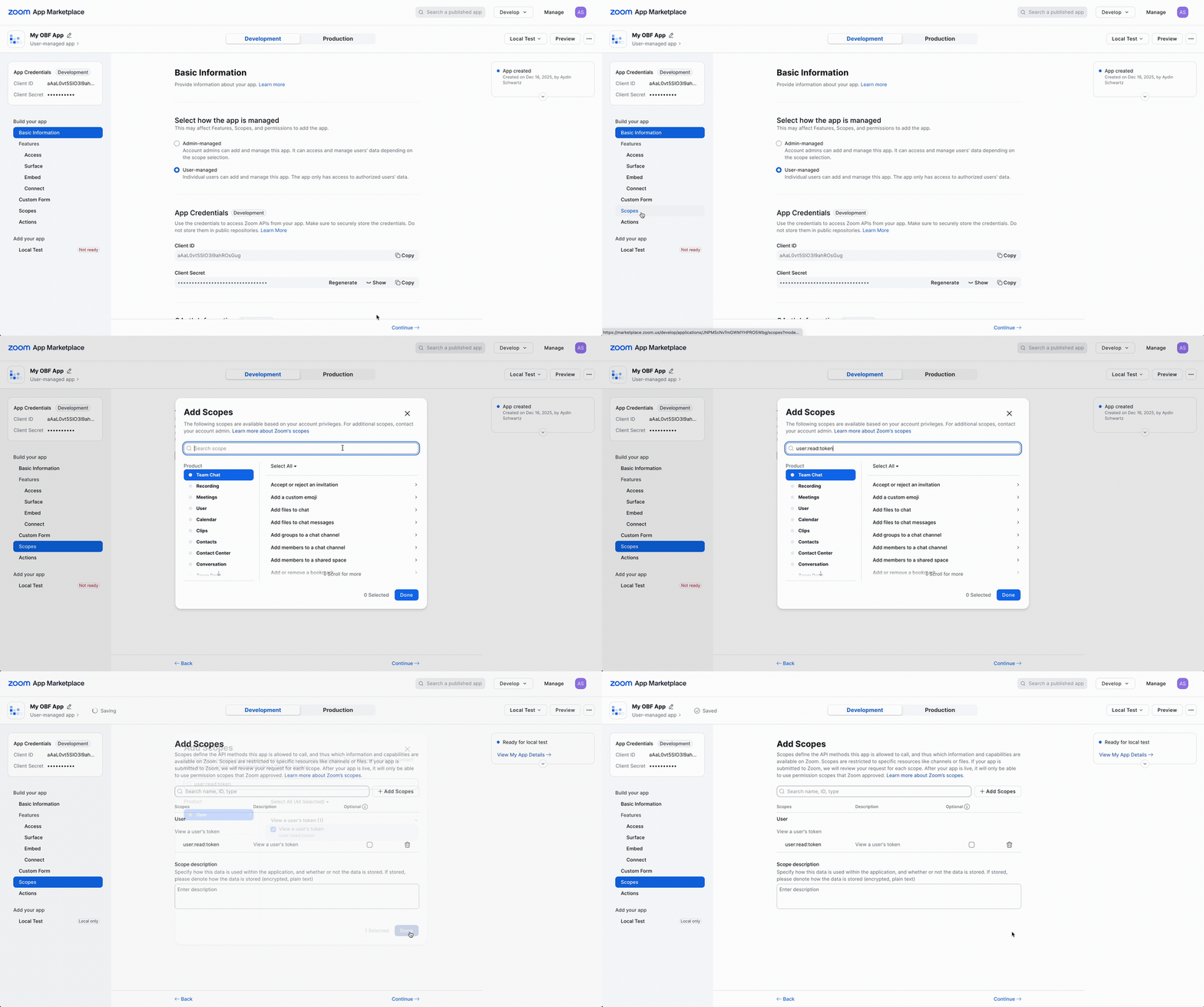
Your Zoom app needs the user:read:token scope to generate OBF tokens. If your app already has access to this scope, you're good to go. If not, you'll need to modify your Zoom App and have users reauthorize it. If your app is published, this means you’ll need to go through the Zoom app review process again. However, the Zoom team has stated that they are expediting reviews for apps implementing the OBF token flow.
Here’s how to request the new scope for your Zoom Meeting SDK app if you don’t already have it:
- Go to your app in the Zoom App Marketplace
- Navigate to the Scopes page
- Add the
user:read:tokenscope - If your app has already been published, request a new app review from the Zoom team.
Step 2: Authorize users and get access tokens
When a user installs or connects your app, they need to go through Zoom's OAuth authorization flow. To quickly test this out for local development, you can click "Add App Now" from your app's Local Test page. This will allow you to authorize the app.
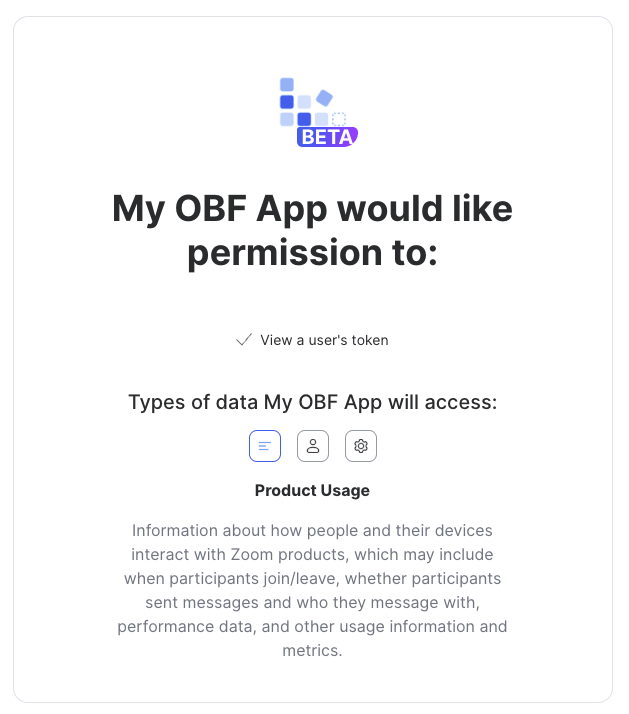
After the user authorizes, Zoom redirects them to your redirect_uri with an authorization_code in the URL.
Exchange this authorization code for an access token by making a POST request:
curl --request POST \
  --url "https://zoom.us/oauth/token?grant_type=authorization_code&code={authorization_code}&redirect_uri={redirect_uri}" \
  --header "Authorization: Basic {BASE64_ENCODED_CLIENT_ID:CLIENT_SECRET}" \
  --header "Content-Type: application/x-www-form-urlencoded"
The response will include an access_token and a refresh_token. You can use the refresh_token to get new access tokens without having to re-authorize.
Store both the access token and refresh token securely. You'll need the access token to generate OBF tokens, and you'll need the refresh token to get fresh access tokens when the current one expires.
Step 3: Generate the OBF token
Once you have the user's OAuth access token, call Zoom's Get User Token endpoint with type=onbehalf:
curl --request GET \
  --url "https://api.zoom.us/v2/users/me/token?type=onbehalf&meeting_id={meeting}" \
  --header "Authorization: Bearer {access_token}"
This returns an OBF token that your Zoom Meeting SDK app can use when joining the meeting. You can pass this to the Zoom SDK when your app requests to join the meeting. Note that the token is short-lived (2 hours), so you should generate it just before your app joins to avoid expiration issues.
OBF tokens are scoped to a specific meeting.
You can’t generate a generic OBF token that will work for all of a user’s meetings. You need to provide a specific meeting ID whenever you’re generating an OBF token, and the token will only work for this particular meeting.
Handling join failures with the OBF token
If your SDK app tries to join before the authorizing user has entered the meeting, the join attempt will fail. Zoom recommends implementing the following retry logic:
- Catch the join failure error
- Wait 1-5 seconds
- Retry the join attempt
Starting with SDK version 6.6.10 (released November 2025), you'll get a specific error code for this scenario: MEETING_FAIL_AUTHORIZED_USER_NOT_INMEETING. This makes it easier to distinguish "user not in meeting yet" from other join failures.
Mapping OBF tokens to the correct meeting
Your SDK app needs an OBF token from someone who will actually be in the meeting. You can't use a token from a service account, from someone who hasn’t gone through your app’s OAuth flow, or from someone who's not attending. This means you need infrastructure to map users to their upcoming meetings. This is a nontrivial task, and your implementation will vary depending on your own preferences.
Two ideas for building this mapping:
-
You can use Zoom's Meetings API (
GET /users/{userId}/meetings) to fetch each user's scheduled meetings and maintain a mapping of meeting IDs to users. -
If you already have a calendar integration with your users’ Google Calendar/Outlook calendars, you can parse meeting invites directly to build the mapping.
Whichever approach you choose, remember that you're now dependent on the authorizing user's presence: if they don't show up, your SDK app can't join either.
Conclusion
The OBF token flow introduces a significant change to the authentication mechanism for the Zoom Meeting SDK. If you have a Zoom Meeting SDK app in production, you should start implementing this now. The OAuth setup, token management, and user-meeting mapping logic all take time to build and test. Waiting until February 2026 means you'll be rushing to meet the deadline.
If you have any questions about the transition to OBF tokens, the Recall.ai team has extensive experience with the Zoom SDK ecosystem, and has helped thousands of companies navigate the Zoom app approval process. We would be happy to advise you on any issues or questions you may have. You can reach out to support@recall.ai and we’ll be happy to provide you with guidance. We’re also always happy to chat about Recall.ai’s Desktop Recording SDK or a Mobile Recording SDK if you want a different meeting recording form factor or Recall.ai’s Meeting Bot API if you are looking for a meeting bot api that works across video conferencing platforms.
FAQ
When does the OBF token requirement take effect?
Enforcement begins February 23, 2026. All Zoom Meeting SDK apps must implement OBF token authorization to join external meetings.
Which video conferencing platforms does the OBF token requirement affect?
The addition of the OBF token only applies to Zoom, other platforms like Google Meet, Microsoft Teams, Webex, or Slack Huddles are not impacted by the addition of Zoom’s OBF token. Recall.ai’s Meeting Bot API is a great solution to build meeting bots that work on all these platforms, and keep up to date with platform changes.
Can I get an OBF token from any participant in the meeting?
No. You can only get OBF tokens from users who have authorized your app via OAuth. If someone is in the meeting but hasn't authorized your app, you can't generate an OBF token from their account.
Is there any way to record Zoom meetings without a meeting bot?
If you prefer a botless form factor you can use either Recall.ai’s Desktop Recording SDK or Mobile Recording SDK.
What happens when the user who provided the OBF token leaves the meeting?
Your app’s session ends immediately. The Zoom SDK app cannot continue participating in the meeting without an active OBF token from a present user.
Do all participants need to authorize my app?
No, only the participant whose OBF token you're using needs to authorize your app. Your Zoom Meeting SDK app can join the meeting alongside that authorized user, even if other participants haven't authorized your app.
What's the minimum SDK version required?
SDK version 5.17.5 or later is required for compliance. Zoom recommends using version 6.6.10 (released November 2025) or later for improved error messaging around OBF token issues.
How long does an OBF token last?
OBF tokens are short-lived credentials that expire after 2 hours. Generate them just-in-time before your Zoom Meeting SDK app joins each meeting to avoid expiration issues.
Will this affect meetings within my own Zoom account?
The introduction of OBF will not affect meetings within your own Zoom account.The OBF token requirement specifically applies to external meetings (meetings hosted by users outside your Zoom account). Meetings within your own account can still be joined with just your SDK credentials, though Zoom's long-term direction suggests eventually requiring OBF tokens for all scenarios.
Do I need to resubmit my app to the Zoom Marketplace?
It depends on your current OAuth implementation. If you already have the user:read:token scope, no resubmission is needed. If you need to add the user:read:token scope, yes, you need to resubmit for review. If you're implementing OAuth for the first time, yes, you need to submit for review. Zoom is prioritizing apps implementing OBF compliance, but you should still get this done as soon as possible.


