


Voiceprinting, combined with speaker diarization, can produce accurately labeled meeting transcripts that power downstream AI applications. However, building a reliable voiceprinting system requires significant engineering work to identify speakers accurately across recording conditions while keeping enrollment simple for users.
What is voiceprinting?
A voiceprint is a digital representation of a person’s vocal characteristics, such as pitch, tone, and pronunciation. Developers can replace generic transcript labels like “Speaker 1” and “Speaker 2” with speakers’ names without relying on meeting metadata, by matching voices in a meeting recording to stored voiceprints.
In this blog, I’ll explain how voiceprints work alongside speaker diarization to identify speakers by name in meeting transcripts. But first, let’s look at how developers identify speakers without voiceprints to understand why this approach falls short and how voiceprinting can help.
How to get speaker-labeled transcripts without voiceprints
Before you can assign speaker names, you need to determine which parts of the recording belong to each speaker. In a two-person meeting with separate audio streams, the microphone captures the local participant’s speech, and the meeting audio captures the remote participant’s speech. Each stream contains only one voice, so you can tell the speakers apart by which stream they’re on.
When multiple remote participants join a meeting, their voices are mixed into a single meeting audio stream. In this situation you need your diarization process to group speech from the same speaker and assign each speaker a name when their identity is available, or a generic label like “Speaker 1” when it isn’t.
Once each speech segment has a generic speaker label, developers can use meeting metadata, such as audio stream identifiers and participant names, to map labels to speaker names. They can also analyze video frames to determine who is speaking by pulling out the display name, although this requires participants to be visible on camera. The goal is to map “Speaker 1” to a specific name like “John.” But the accuracy of those matches depends on what meeting metadata is available and its reliability. Both approaches become less reliable when multiple people share a device.
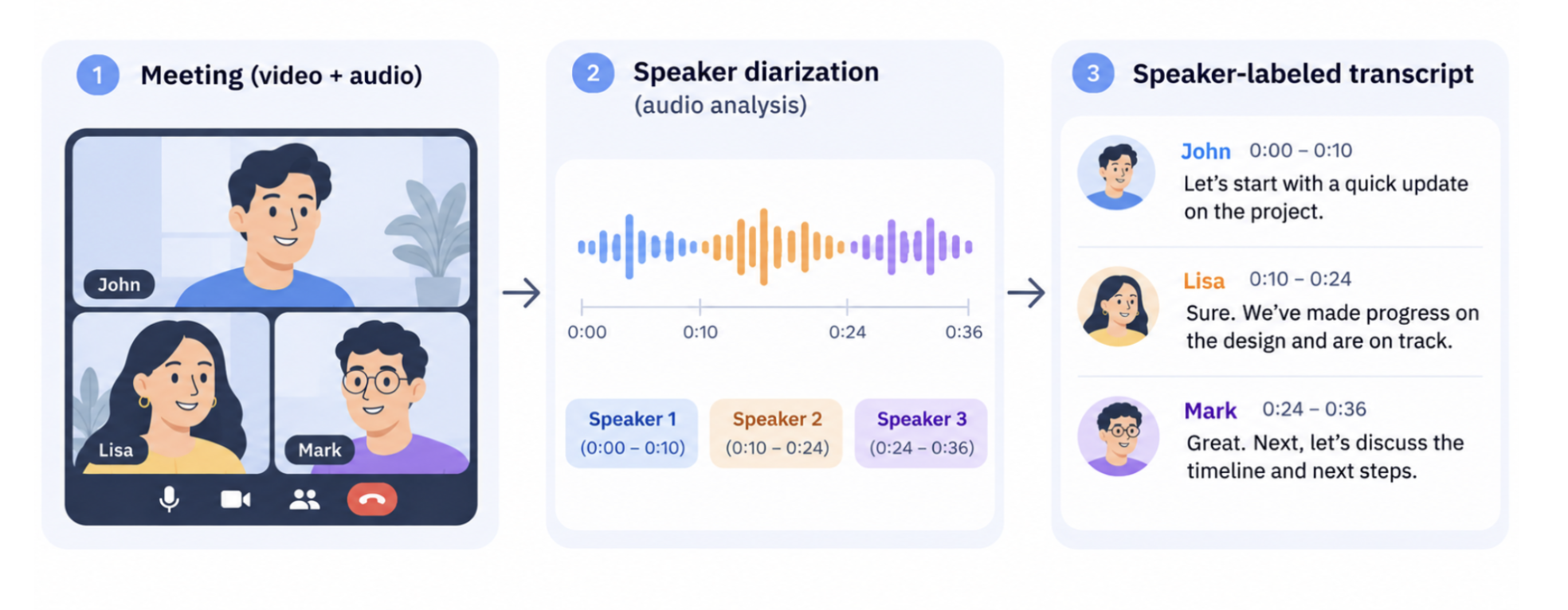
Limitations of using speaker diarization to label transcripts
When multiple people share a microphone, the limitations of speaker diarization become apparent. Separate audio streams can no longer distinguish between individual speakers, so developers must rely on methods such as audio-based speaker diarization or video-based speaker detection to distinguish between their voices. While these methods can distinguish between speakers, identifying them by name still requires additional information such as meeting metadata.
For example, imagine a meeting of three people, Jane, John and Tim, where Jane and John join a meeting from Jane’s laptop and Tim joins from a separate device. The participant list and video tiles show only Jane and Tim. A system that relies on meeting metadata alone may treat the recording as having two speakers and attribute both Jane’s and John’s speech to Jane because they share a microphone, video tile, and display name.
But even if audio-based speaker diarization correctly distinguishes three speakers, the meeting metadata has no participant entry for John. His speech may remain under a generic label like “Speaker 3.” If the system also uses voice similarity to assign names, it may attribute John’s speech to Tim if their voices sound alike.
Shared devices may seem like an edge case, but they’re common in hybrid meetings, including sales calls and interviews. Several people might join a remote meeting from one conference room, or an interviewer and candidate might share a microphone during a recorded in-person interview.
In either case, assigning speech to the wrong person carries the error into meeting summaries, CRM updates, and interview notes.
Why accurate speaker labels matter
Meeting recordings power workflows like CRM updates, personalized follow-up emails, and action-item tracking. The accuracy of these workflows depends on knowing who said what. A speaker attribution error can cause a customer's request to be logged under the wrong CRM contact, a follow-up email to contain inaccurate information, or an action item to be assigned to the wrong person and left unfinished. If users overlook these errors, customer requests may go unanswered, important tasks may be missed, and customer relationships may suffer. Even when users catch these errors, correcting them manually takes time.
Voice printing reduces these errors by identifying speakers without relying on meeting metadata. It works by generating voiceprints that can be used to recognize speakers in meeting recordings.
How voiceprinting works
As mentioned earlier, voiceprinting analyzes a person’s unique vocal characteristics. A speaker recognition model encodes patterns in a person’s voice as a speaker embedding, which is a set of numbers that represents their vocal characteristics. To identify a speaker, the system generates an embedding from a segment of their speech in the meeting recording and compares it with stored speaker embeddings.
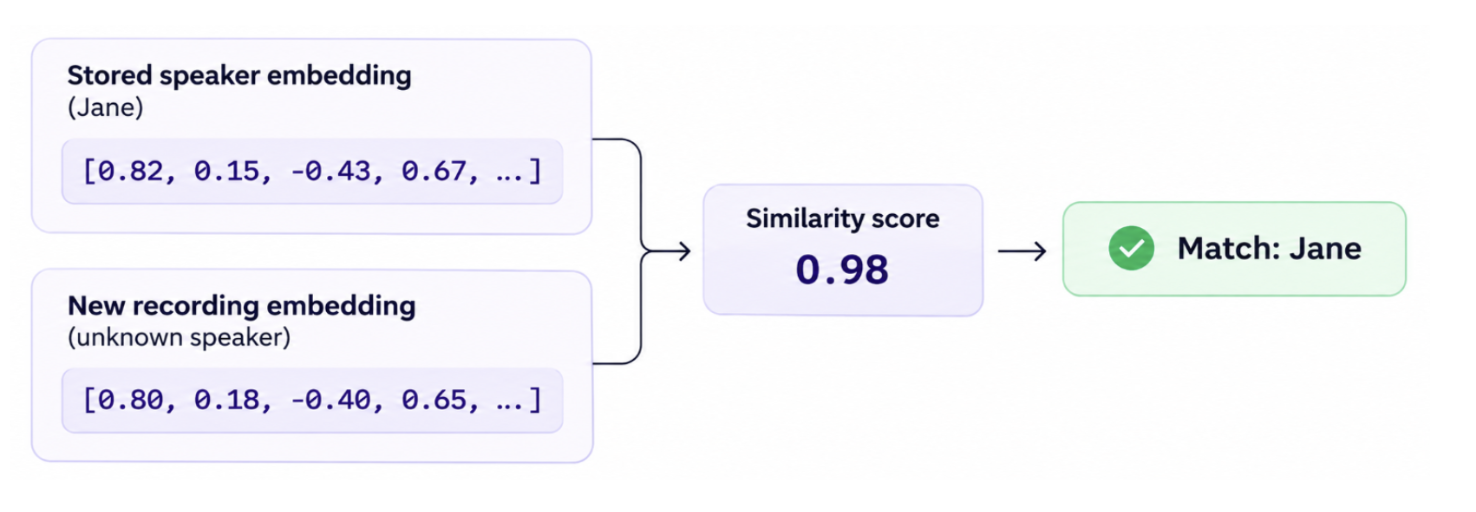
The voice is converted to an embedding by a speaker embedding model. Common models include ECAPA-TDNN, TitaNet, and ResNet-based speaker recognition models. These models use different architectures and vary in how accurately and quickly they process audio. It is important to choose a model based on the audio conditions you expect to encounter. Read more about these models in the appendix.
Once you’ve chosen a model, you can use open enrollment to collect voice samples by asking each speaker to speak into a microphone for a few minutes before a meeting. The model converts each sample into a speaker embedding. Store the embedding as a voiceprint linked to the speaker’s name so you can identify them in future meetings.
In the earlier example, Jane and John join a meeting with Tim from Jane’s laptop. Speaker diarization distinguishes Jane’s and John’s voices within the shared audio stream, while voiceprinting matches their speech against stored voiceprints to identify them by name. Voiceprinting complements speaker diarization by providing identities that meeting metadata alone cannot reliably supply. However, making this work reliably at scale requires more than matching voices to stored profiles.
Technical challenges of implementing voiceprinting at scale
One of the first challenges of deploying voiceprinting at scale is collecting reference voiceprints to identify speakers. As mentioned previously, one approach is open enrollment, where users opt in and speak into a microphone for a few minutes. Open enrollment also provides a way to obtain explicit user consent for collecting, storing, and using their voiceprints, helping developers comply with applicable state privacy, consent, and biometric laws. Developers can then store the resulting voiceprints and use them to identify speakers in future meetings, subject to that consent.
However, open enrollment has limitations. A user may enroll their voiceprint using a laptop microphone but later attend meetings from a phone or conference room. Differences in microphones and recording environments can affect how their voice is captured, making it harder to recognize them across meetings.
Audio quality can vary depending on how a meeting is recorded. Virtual meeting applications typically compress audio to reduce the amount of data transmitted in real time, which can degrade audio quality and make speech sound muffled or distorted. Unstable internet connections can cause packet loss, resulting in choppy audio or missing words when some audio data fails to reach its destination. Additionally, noise suppression applied by meeting applications like Zoom, Google Meet, and Microsoft Teams, designed to improve audio clarity by filtering out background noise can inadvertently remove parts of speech.Together, these effects can alter or remove the vocal characteristics a voiceprinting system relies on, making it harder to match a speaker’s speech to a stored voiceprint.
In-person meetings face different challenges, including room echo, background noise, and poor microphone quality, which can make speech sound distant or unclear. These conditions can obscure a speaker's distinctive vocal characteristics, making it harder to match their speech to their enrolled voiceprint.
One way to improve speaker recognition accuracy is to collect voice samples from the same person across different devices and recording environments, such as laptops, phones, and conference rooms. However, requiring users to enroll across all these scenarios makes onboarding cumbersome and could discourage users from completing enrollment, ultimately hurting adoption.
Even after collecting voiceprints, developers need to ensure the system can accurately identify speakers at scale. Voiceprinting systems can incorrectly identify speakers, particularly when two people have similar-sounding voices. To reduce these errors, developers need a large, representative dataset to evaluate recognition accuracy across different speakers and recording conditions. They also need to establish similarity thresholds that prevent the system from assigning identities when a match is uncertain. Without sufficient testing, these errors can lead to incorrect speaker attribution in meeting transcripts.
Recall.ai offers perfect speaker diarization
Voiceprinting has the potential to improve the accuracy of speaker-labeled transcripts and make downstream applications more reliable. However, deploying it at scale requires an enrollment process that minimizes friction for users, extensive testing to ensure accurate speaker identification, and reliable speaker diarization to distinguish voices when multiple people share an audio stream. Errors at any of these stages can lead to misattributed speech and a frustrating user experience.
If you're interested in building meeting recording applications, Recall.ai offers both a Desktop Recording SDK and a Meeting Bot API with perfect speaker diarization. You can sign up for free.
Appendix
The different speaker embedding models
| Model | Mechanism | Tradeoff | Volume it can process |
|---|---|---|---|
| ECAPA-TDNN | Focuses on speaker-specific characteristics and generates voice embeddings. | Strong established baseline for speaker recognition, but larger configurations can require more computing resources. | Can scale from individual recordings to large batches |
| TitaNet | Uses efficient convolutional layers and attention mechanisms to extract speaker characteristics. | Offers different model sizes to balance accuracy and computational cost. | Can scale from individual recordings to large batches |
| ResNet | Uses residual neural network layers to extract speaker characteristics from audio features. | Performance and resource requirements vary significantly by architecture and model size. | Can scale to large batches; capacity varies substantially by model size |
Frequently asked questions
What is voiceprinting?
Voiceprinting creates a digital representation of a person's voice based on their distinctive vocal characteristics. The system compares new speech against stored voiceprints to estimate whether it belongs to the same person.
What is speaker diarization?
Speaker diarization determines who spoke when in a recording by distinguishing between voices and labeling them as "Speaker 1," "Speaker 2," and so on. Most speaker diarization systems only assign generic speaker labels without identifying speakers by name. Recall.ai supports perfect diarization, which uses meeting information to attribute speech to individuals, replacing generic labels like "Speaker 1" and "Speaker 2" with names like "Tom" and "John."
When multiple people join a meeting using a shared microphone, their voices are captured into a single audio stream. In these cases, speaker diarization is needed to distinguish between their voices, while voiceprinting can help identify each speaker by name.
Do you need speaker diarization for voiceprinting?
Not necessarily. If each participant has a separate audio stream, voiceprinting can identify speakers by comparing their speech against stored voiceprints without requiring diarization. However, when multiple people share a microphone, speaker diarization is needed to distinguish who spoke when. Voiceprinting can then match those speakers to known identities, allowing transcripts to display names instead of generic labels like "Speaker 1" and "Speaker 2."
Does voiceprinting mean you don’t need speaker diarization?
No. Diarization answers “when did this person speak?”, while voiceprinting answers “does voice match someone we already know?”.
What is the best model for voiceprinting?
There is no single best model for every situation. Speaker embedding models differ in accuracy, computational requirements, and how well they handle different recording conditions. Popular options include ECAPA-TDNN, TitaNet, and ResNet-based models.


